Shipping, tax and marking an order shipped
Pick how an order ships, get real rates to show up, choose how tax is charged, and close the loop when it leaves the building.
Choosing how it ships
In the order's Payment card, press Add shipping or delivery. The choices cover what a made-to-order shop actually does:
- Shopify shipping rate, from your own Shopify shipping settings.
- Freight, with pallets, freight class, BOL and PRO numbers.
- Local delivery, Pickup, or No shipping.
- Buyer's carrier account or Their shipping company, when the customer ships on their own account.
- Custom method, with a price you type.
Delivery details like a Ship by date or Liftgate needed ride along with it, and the customer sees and approves the shipping as part of the order.
When no rates come up
Rates need the shipping address and the items before they can be worked out, and they come from your Shopify shipping settings, so a zone or rate missing there is missing here as well.
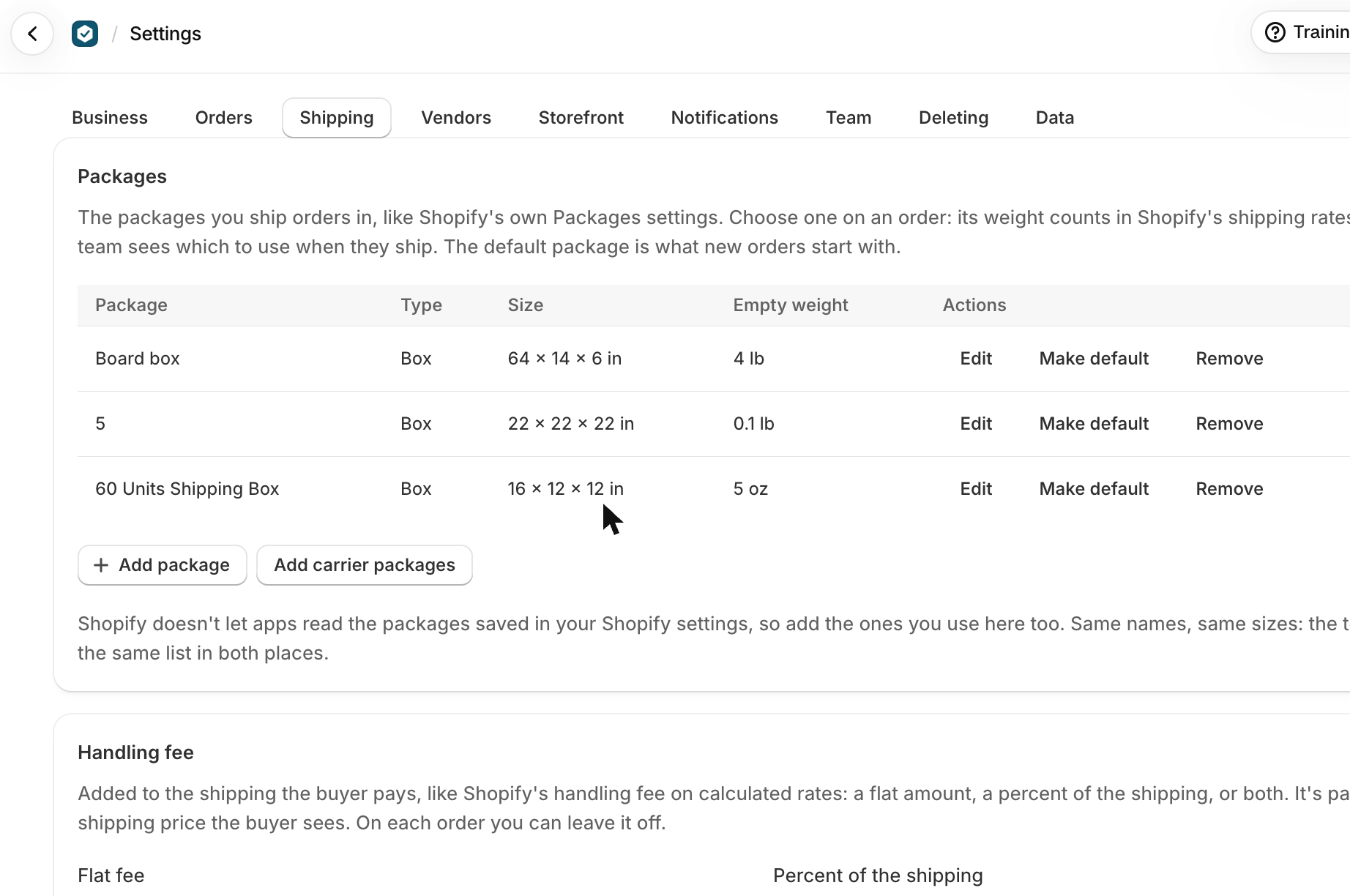
Shopify does not let an app read the packages saved in your Shopify settings, so add the boxes you ship in under Settings, Shipping. The chosen package's empty weight is counted into the rate. Without them, rates can come back wrong or not at all.
Custom method with your own price is always there when a carrier will not quote.
Packages are not cosmetic. Add each box you actually ship in, with its size and empty weight, and choose one on an order: that weight counts in Shopify's rates and your team can see which box to use when they pack. The default package is what new orders start with.
The handling fee
Settings, Shipping also carries a handling fee, the same idea as Shopify's own: a flat amount, a percent of the shipping, or both. It is added to Shopify's rates and to freight, and the customer sees one shipping price rather than a fee broken out. On any single order you can untick it to leave it off.
Tax
Press the link beside Tax in the Payment card and choose one of three:
- Calculated by Shopify, from your Shopify tax settings.
- Your own tax rate, which you can apply to shipping too.
- Don't charge tax.
Your own rate reaches Shopify as a Sales tax line on a tax exempt order, so it does not appear in Shopify's tax reports. The orders export has a Tax rate column for when you need those numbers.
Marking it shipped
- Press Mark as shipped on the order.
- Add the Carrier, Tracking number and Tracking link.
- Leave Email the buyer Shopify's shipping confirmation ticked, unless you would rather tell them yourself.That email is sent by Shopify, not by the app.
It marks everything not yet shipped as shipped. To ship part of an order, do it in Shopify and it comes back here on its own.
What trips people up
- Shopify doesn't let apps read the packages saved in your Shopify settings, so add the ones you use here too, with the same names.
- Carrier packages start with an empty weight of 0. Edit one to set it if you want it counted.
- Rates need the address and the items first.
- Your handling fee (Settings, Shipping) is added to rates and freight; untick it to leave it off one order. The buyer sees one shipping price.
- The buyer sees and approves their shipping company and the delivery details. Freight details are for your team and the Shopify order's note.
- It marks everything not shipped yet as shipped. To ship part of an order, do it in Shopify: it comes back here.
Check you have it
Where does a package's empty weight show up?
In Shopify's shipping rates for an order packed in it, and on the order's packing line for the team.
Short answers on this
- Which shipping options can I offer?
- No shipping rates come up on an order.
- How is tax charged?
- Which payment terms can I offer?
- The buyer paid by check or bank transfer.
- How do I remind a buyer to pay?
- How do I mark an order as shipped?
Read next
- Payment terms, invoices and getting paidThe four ways a customer can pay, how to record money that arrives outside Shopify, and where the invoice and receipt come from.
- Build an order from scratchFrom pressing New order to a page your customer can approve: the company and buyer, the items, shipping, tax and payment terms.