Every badge on an order, and what it means
The five states an order moves through, every payment and fulfilment badge it can carry, and what each one is telling you to do next.
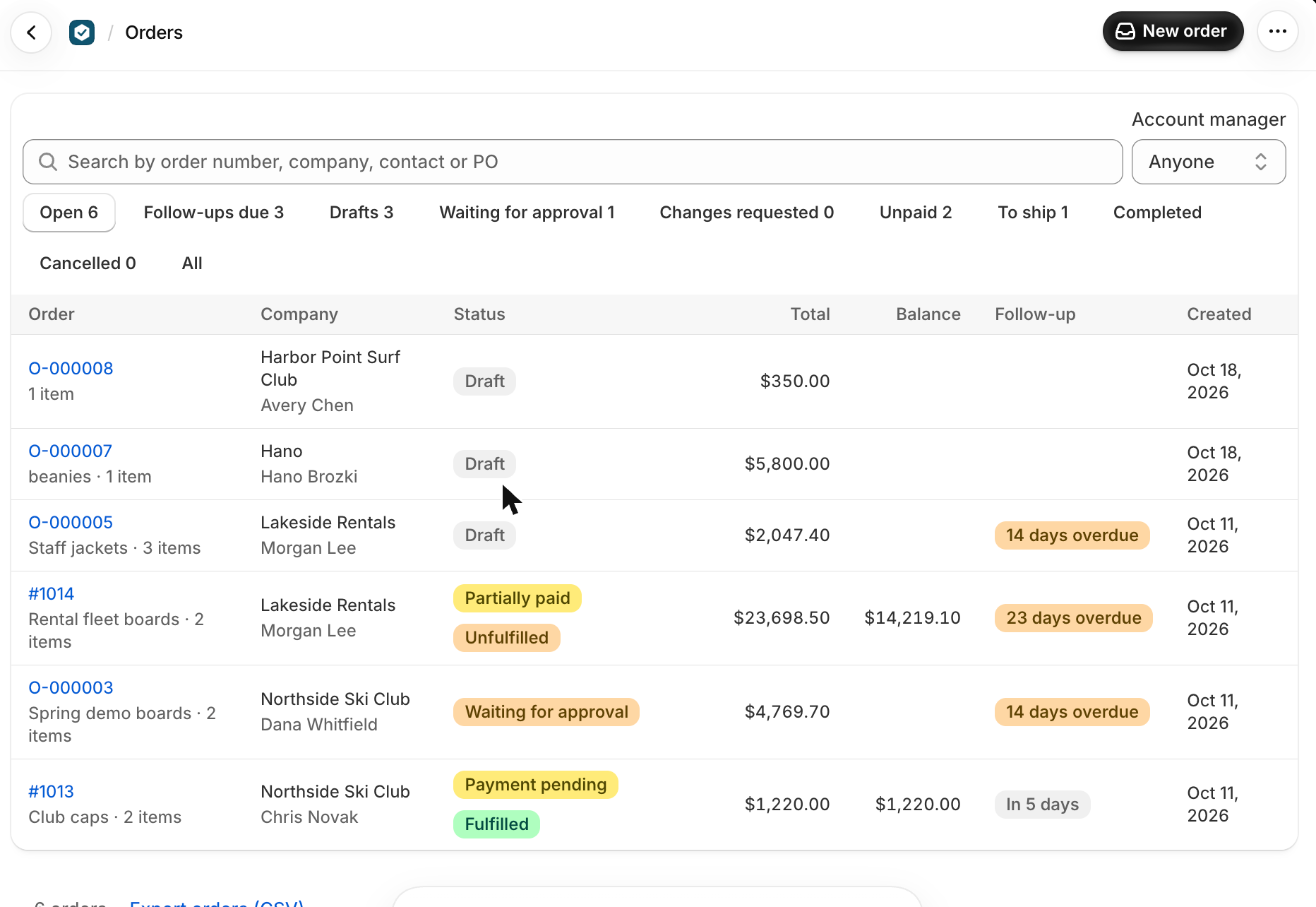
An order carries up to three badges at once, and they answer three different questions: where the order is with the customer, where the money is, and where the goods are. Reading them together tells you what to do without opening anything.
Where it is with the customer
This is the order's own status, and it only ever moves one way until it is approved.
- Draft: you are still building it. The customer has no page and no link. Everything can be changed freely, and nothing exists in Shopify.
- Waiting for approval: it has been sent. The link is live and a follow-up is set to check back after the business days in Settings, Orders. You can still correct it: save, then Review and update order, and they see the new version at the same link.
- Changes requested: the customer pressed Request changes instead. Their message is in Notes and a follow-up is due straight away.
- Approved: they said yes, or you recorded that they did. The Shopify order now exists and the order goes by its Shopify number, like #1001. Changes from here need Edit order and a second approval.
- Cancelled: it is closed. To order the same again, use Duplicate at the top of the page.
Nothing is in your Shopify Orders until the moment of approval. A draft or a sent order that never gets approved leaves no trace in Shopify at all.
Where the money is
The payment badge comes from Shopify plus anything you have recorded by hand, so it is the same picture Shopify has.
- Payment pending: approved, and waiting for the customer to pay.
- Partially paid: some has arrived, by checkout or recorded by you. The Balance column shows what is left.
- Paid: the full amount is in.
- Overdue: the due date set by the payment terms has passed and a balance is still outstanding. This is the one to act on.
- Authorized: the card is authorized but not captured yet.
- Refund owed: more has been paid than the order now comes to, usually after a change that lowered the total.
- Partially refunded, Refunded, Voided: what Shopify says about money going back.
Home's Money owed is every order with a balance, in one list, which is faster than reading the badges one by one.
Where the goods are
The fulfilment badge appears only once the Shopify order exists, and it follows Shopify: Unfulfilled, Partially fulfilled or Fulfilled. Marking an order shipped here marks everything not yet shipped as shipped; to ship part of one, do it in Shopify and it comes back.
Reading them together
- Waiting for approval with an overdue follow-up: they have gone quiet. Call them.
- Approved and Payment pending on net terms: nothing to do yet, the due date is doing the work.
- Paid and Unfulfilled: it is yours to make and ship.
- Partially paid on deposit terms: production can start, the balance is due before it ships.
- Refund owed: a change lowered the total after they paid. Refund the difference in Shopify.
What trips people up
- If the buyer approves by phone or email instead, press Record their approval and type their full name.
- If Shopify's total changes before they approve (a tax rate change), they're asked to approve the new total.
- You can't record more than the balance.
- Below Shopify Plus, Shopify takes one payment for the whole balance: part payments recorded here wait, marked Recorded here, not in Shopify yet, until the rest is in.
- A payment recorded by mistake can be removed while it isn't in Shopify yet (type delete to confirm).
- It marks everything not shipped yet as shipped. To ship part of an order, do it in Shopify: it comes back here.
Check you have it
The buyer says yes on the phone. What do you do?
Press Record their approval, type their full name, choose By phone, and press Record approval. The order is placed in Shopify.
Short answers on this
- How do I build an order?
- How do I add a mockup or proof to an item?
- Can I change a mockup after the buyer has the order?
- Can a buyer approve only some items or mockups?
- Where are mockups and uploaded files kept?
- How do I send an order to the buyer?
- When does the order appear in Shopify?
- The buyer approved by phone or email. What do I do?
- Is there a record of what the buyer approved?
- The buyer asked for changes.
- How do I change an order after it's approved?
- How do I give a discount?
- How do I repeat an order?
- How do I cancel an order or give a refund?
- What do the order statuses mean?
- What are numbers like L-000001 and C-000001?
Read next
- Build an order from scratchFrom pressing New order to a page your customer can approve: the company and buyer, the items, shipping, tax and payment terms.
- Payment terms, invoices and getting paidThe four ways a customer can pay, how to record money that arrives outside Shopify, and where the invoice and receipt come from.